
Polished mobile interface
OLED dark theme, large posters and one-handed navigation: Live TV, movies and series at your thumb.
JIPTV is an IPTV player for iOS and iPadOS that turns your M3U playlists and Xtream accounts into a premium streaming interface: Live TV by category, movies and series with posters, profiles and continue watching. Download it from the App Store — you bring the sources.
Available now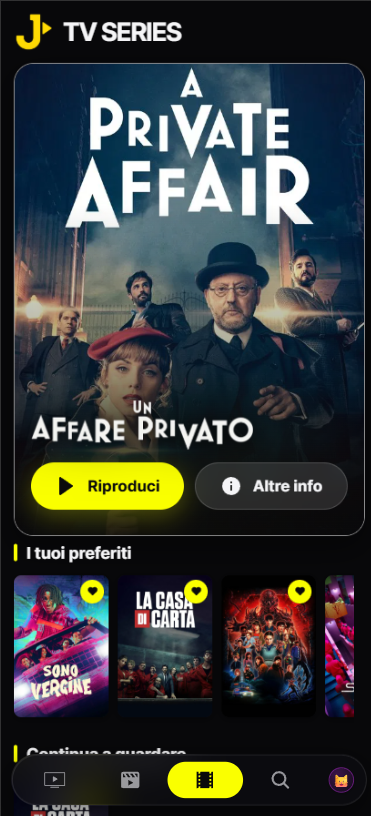
Your whole playlist catalog, organized and fast to browse with one finger — and on the larger iPad display too.
OLED dark theme, large posters and one-handed navigation: Live TV, movies and series at your thumb.
Channels from your M3U or Xtream source grouped by category, with quick zapping between them.
Posters, seasons and episodes presented like a streaming platform, not a list of links.
Start an episode on iPhone and finish it on iPad, Apple TV or Mac: continue watching is synced.
Each profile keeps its own favorites and history, even on a shared iPad.
Find a channel, movie or series among thousands of entries in a few keystrokes.
Search "JIPTV" on the App Store on your iPhone or iPad and install it. The player subscription is activated inside the app.
Open Playlist Management and paste your M3U link, or enter your provider's Xtream host, username and password.
Live TV, movies and series appear organized within seconds. Sign in with the same account to find everything on your other Apple devices.
There are dozens of IPTV players for iPhone on the App Store. Before picking one, look at four practical things:
JIPTV is available across the whole Apple ecosystem: besides iPhone and iPad there are apps for Apple TV and Mac. With the same account you get your profiles, favorites and watch history on every screen.
The player subscription is purchased and managed inside the app through the App Store — never on this website — and only unlocks the software features: it does not grant access to any content.
JIPTV is already available across the whole Apple ecosystem: iPhone, iPad, Apple TV and Mac. Windows, Android, Android TV, Fire TV and Samsung and LG Smart TVs are coming soon.
The criteria are always the same: M3U and Xtream support, well-organized Live TV and VOD, profiles and sync across devices. JIPTV meets all of them and is available on the App Store for iPhone and iPad.
Yes. JIPTV is available for iPhone and iPad (iOS and iPadOS) on the App Store. With the same account you get your profiles and continue watching on both.
Open JIPTV, go to Playlist Management and paste your M3U playlist link, or enter your Xtream credentials (host, username, password). The player automatically organizes Live TV, movies and series.
No. JIPTV is only a player: it does not provide, sell or host any channel or content. It only plays M3U playlists or Xtream accounts from providers you are authorized to use.
The download is free. Using the player requires a subscription, which is purchased exclusively inside the app through the App Store, never on this website.